 español



Tel : +86 13729892225
Correo electrónico : export@dtechelectronics.com
Correo electrónico : hermadi57@gmail.com(Indonesia Local Zone)
Correo electrónico : 2938155912@qq.com(Amazon After-Sales Service Zone)










Tel : +86 13729892225
Correo electrónico : export@dtechelectronics.com
Correo electrónico : hermadi57@gmail.com(Indonesia Local Zone)
Correo electrónico : 2938155912@qq.com(Amazon After-Sales Service Zone)
Categorías del blog
Mensajes recientes
Cable serie RS232 frente a adaptador USB a serie: Guía industrial completa
Cable serie RS232 frente a adaptador USB a serie: Guía industrial completa
En los sistemas de comunicación industrial, los cables serie RS232 y los adaptadores USB a serie se utilizan ampliamente para conectar PLC, máquinas CNC, robots, escáneres de códigos de barras y equipos de automatización industrial. Muchos ingenieros y técnicos de campo se esfuerzan por encontrar el equilibrio entre una conexión estable a largo plazo y la compatibilidad portátil.
Esta guía completa compara el cable serie RS232 con el adaptador USB a serie, explica las características principales, casos de aplicación industrial reales, solución de problemas y cómo seleccionar la mejor solución para su proyecto industrial.
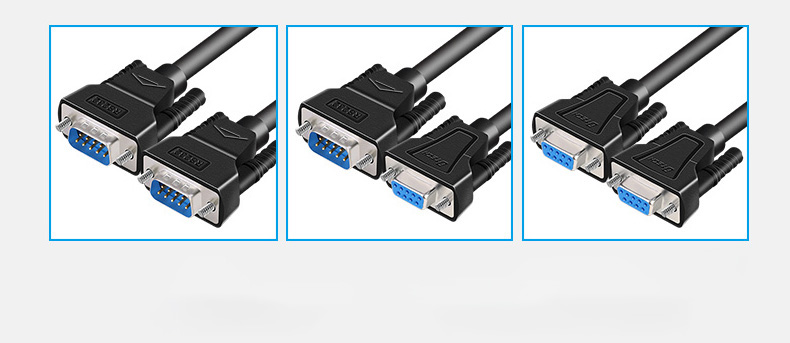
¿Qué es un cable serie RS232?
Un Cable serie RS232 Es un cable de comunicación industrial tradicional de conexión directa para la transmisión de datos punto a punto entre dispositivos. Utiliza estándares Conectores DB9 o DB25 y no requiere controladores ni conversión de señal.
Características principales
● Transmisión de datos ultraestable para funcionamiento industrial 24/7
● Fuerte rendimiento antiinterferencias en entornos difíciles
● Larga vida útil y bajo mantenimiento
● Amplia compatibilidad con dispositivos industriales heredados
Aplicaciones comunes
● Programación de PLC (Siemens, Mitsubishi, Omron)
● Sistemas de control de máquinas CNC
● Líneas de producción de automatización industrial fija
● Escáneres de códigos de barras y sensores industriales
● Equipos de laboratorio y de ensayo de precisión
Casos de aplicación reales de cables serie RS232
1. Control PLC de la línea de montaje automotriz
Una gran fábrica de automóviles utiliza cables serie RS232 para conectar los PLC de Siemens con los paneles de control de la línea de montaje. La conexión directa garantiza una comunicación estable las 24 horas del día, los 7 días de la semana, y evita errores de datos durante la producción continua.
2. Transmisión de programa fijo de máquina CNC
Los centros de mecanizado CNC de alta precisión utilizan cables RS232 para transferir los programas de procesamiento entre el controlador principal y el panel de control. Su excelente inmunidad a las interferencias garantiza una transmisión de datos estable en entornos industriales con alta interferencia electromagnética (EMI).
3. Monitorización en tiempo real del armario de distribución eléctrica
Los sistemas de distribución de energía industrial utilizan cables RS232 para la monitorización fija a largo plazo. Este sistema recopila de forma fiable datos de voltaje, corriente y temperatura sin conflictos entre controladores ni pérdida de señal.
4. Comunicación de equipos semiconductores
Los equipos de fabricación de semiconductores utilizan cables serie RS232 para una comunicación estable y con bajo margen de error entre controladores y sensores, cumpliendo con los requisitos de transmisión de datos de alta precisión en entornos de salas limpias.
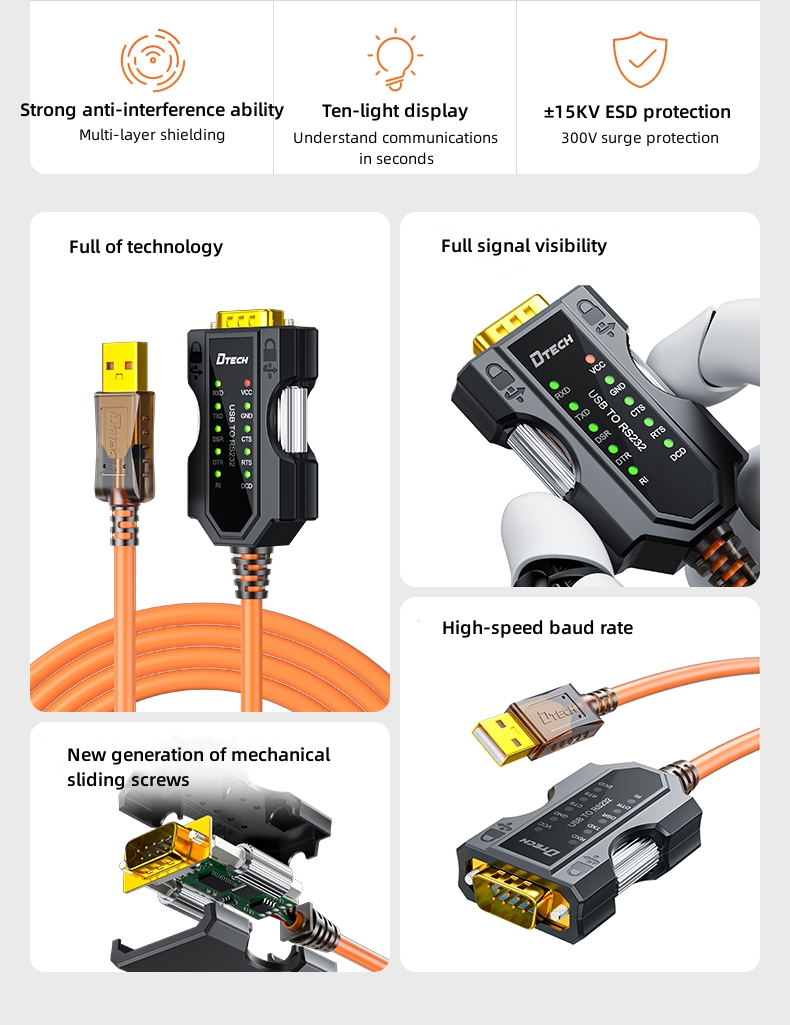
¿Qué es un adaptador USB a serie?
A Adaptador USB a serie Convierte señales USB en señales seriales RS232, lo que permite que las computadoras portátiles modernas sin puertos COM se comuniquen con dispositivos industriales RS232. Utiliza conjuntos de chips confiables como FTDI o Prolific .
Características principales
● Convierte puertos USB en interfaces de dispositivos RS232.
● Requiere instalación de controladores
● Compatible con Windows, Mac y Linux
● Portátil, ligero y fácil de transportar
● Ideal para mantenimiento en campo y depuración in situ.
Aplicaciones comunes
● Portátiles y ordenadores modernos sin puertos serie integrados
● Mantenimiento y reparación in situ de equipos de campo
● Conexiones temporales de dispositivos
● Conmutación y resolución de problemas en múltiples dispositivos
● Soporte para automatización industrial móvil
Casos de uso reales de adaptadores USB a serie
1. Mantenimiento in situ de los equipos de fábrica
Los técnicos de mantenimiento utilizan adaptadores USB a serie con chip FTDI para conectar ordenadores portátiles a PLC y máquinas CNC en las instalaciones, solucionando así el problema de que los ordenadores modernos carecen de puertos serie para la depuración.
2. Depuración de parámetros in situ de la máquina de envasado
Los técnicos de servicio posventa llevan adaptadores USB a serie para ajustar los parámetros de las máquinas de embalaje, los equipos de clasificación y los sistemas de etiquetado. Su diseño portátil mejora notablemente la eficiencia del trabajo in situ.
3. Conexión temporal de equipos de prueba de laboratorio
Los investigadores utilizan adaptadores USB a serie para conectar ordenadores portátiles con instrumentos de prueba para la recopilación de datos a corto plazo y la calibración, lo que ofrece una implementación flexible y rápida.
4. Depuración del controlador del brazo robótico
Los técnicos en robótica utilizan adaptadores USB a RS232 para depurar los controladores de brazos robóticos in situ. Permite una conexión rápida y la modificación de parámetros sin necesidad de cableado fijo.
5. Calibración del escáner de código de barras para logística
Los equipos de mantenimiento logístico utilizan adaptadores USB a serie para calibrar escáneres de códigos de barras y sistemas de transporte, lo que permite realizar reparaciones rápidas in situ y reducir el tiempo de inactividad de los equipos.
Cable serie RS232 vs. adaptador USB a serie: comparación completa
| Característica | Cable serie RS232 | Adaptador USB a serie |
|---|---|---|
| Tipo de conexión | Conexión serial directa nativa | Conversión de señal USB a RS232 |
| Se requiere conductor. | No | Sí |
| Compatibilidad | Solo para dispositivos con puertos serie | Todos los ordenadores modernos |
| Estabilidad | De grado industrial, altamente estable | Depende del chipset (se recomienda FTDI). |
| Antiinterferencia | Acérrimo | Bueno (la versión industrial es mejor) |
| Escenario de uso | Sistemas industriales fijos a largo plazo | Trabajos y mantenimiento de campo portátiles |
| Caso típico | Conexión PLC a la línea de montaje automotriz | Depuración de máquinas CNC y robots in situ |
Resumen rápido
● Cable serie RS232 Conexión directa y estable para sistemas industriales fijos.
● Adaptador USB a serie Solución de compatibilidad portátil para portátiles modernos
Cuándo usar un cable serie RS232
Elija un cable serie RS232 si:
● Su equipo está equipado con puertos serie DB9/DB25.
● Necesitas una comunicación permanente y estable las 24 horas del día, los 7 días de la semana.
● Su aplicación se encuentra en un entorno industrial fijo.
● Trabajas con PLC, CNC, semiconductores o equipos de potencia.
Cuándo usar Adaptador USB a serie
Elija un adaptador USB a serie si:
● Su portátil o PC no tiene puerto COM integrado.
● Necesitas herramientas portátiles para el mantenimiento de campo.
● Realizarás la depuración y reparación de equipos in situ.
● Trabajas con robots, máquinas de embalaje o dispositivos logísticos.
Problemas industriales comunes y su solución
❗ El adaptador USB a serie no funciona.
Causas: Controladores faltantes o desactualizados, incompatibilidad del chipset, conflictos del sistema.
Soluciones: Instalar controladores FTDI oficiales; utilizar adaptadores industriales de alta calidad.
❗ Fallo de comunicación RS232
Causas: Configuración incorrecta de los pines, discrepancia en la velocidad de transmisión, cable dañado.
Soluciones: Compruebe la configuración de pines estándar del conector DB9; haga coincidir los parámetros de comunicación en serie.
❗ Puerto serie no reconocido
Causas: Error del controlador, puerto USB defectuoso
Soluciones: Reinstalar o actualizar los controladores; cambiar a otro puerto USB.
Cómo elegir la solución industrial en serie adecuada
Elija el cable serie RS232 si
●Necesitas una conexión industrial fija, estable y a largo plazo.
●Utilizas PLC, CNC, equipos de potencia o semiconductores.
Elija el adaptador USB a serie Si
●Utilizas portátiles modernos sin puertos COM.
●Necesita mantenimiento in situ, depuración o configuración del robot.
Necesita RS232 industrial o ¿Productos USB a serie?
Somos un fabricante profesional de cables de comunicación industrial, que proporciona soluciones estables y fiables para clientes industriales de todo el mundo.
Nuestros productos
● Cables serie industriales RS232 (DB9 / DB25)
● Adaptadores USB a RS232 de alta estabilidad (chip FTDI)
● Fabricación de cables a medida
● Servicios OEM y ODM
¿Por qué elegirnos?
● Precio directo de fábrica
● Diseño antiinterferencias de grado industrial
● Producción y entrega rápidas
● Soluciones a medida para sistemas de automatización, robótica, CNC y PLC.
© Derechos de autor: 2026 Guangzhou Dtech Electronics Technology Co.,Ltd. Todos los derechos reservados.

